
Client AddOns
5 files
-
Custom Heroic Flags
By Zelos
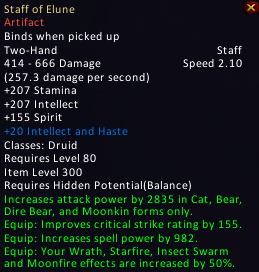
This addon will allow servers to create custom heroic flags for their items based on itemlevel. By default the addon adds flags to all tiers. An optional SQL is provided to update existing blizzlike items, giving them their correct Tiers on their tooltips.
Default List
ItemLevel: 66 = Tier 1
ItemLevel: 76 = Tier 2
ItemLevel: 86 = Tier 3
ItemLevel: 88 = Tier 3
ItemLevel: 92 = Tier 3
ItemLevel: 120 = Tier 4
ItemLevel: 133 = Tier 5
ItemLevel: 146 = Tier 6
ItemLevel: 154 = Tier 6
ItemLevel: 200 = Tier 7
ItemLevel: 213 = Tier 7.5
ItemLevel: 219 = Tier 8
ItemLevel: 226 = Tier 8.5
ItemLevel: 232 = Tier 9
ItemLevel: 245 = Tier 9.5
ItemLevel: 258 = Tier 9 Heroic
ItemLevel: 251 = Tier 10
ItemLevel: 264 = Tier 10.5
ItemLevel: 277 = Tier 10 Heroic
Adding your own custom flags.
Open core.lua Add the following new line under [277] = "|cff00FF00Tier 10 Heroic|r",
[ILVL] = "TEXTHERE|r", Replace [ILVL] with your desired itemlevel. EXAMPLE: [300] Replace TEXTHERE with your desired text. EXAMPLE: Tier 11 Optionally you may add color to the text. EXAMPLE:|cff00FF00Tier 11|r Be sure your item has the Heroic Flag(8) enabled on it in item_template. Be sure your item has the correct itemlevel set in the item_template. Restart Server/Reload Table. Clear Cache. Restart WoW. Enjoy It's important to note that this addon does nothing on it's own. You HAVE to add the heroic flag to items server-side and make sure the ITEMLEVEL is correct before it will work correctly!
Created by Fenuks.
Edited by Hawjiki.
Git: https://github.com/Felskorn-WoW/HeroicFlags
107 downloads
Updated
-
Dragonflight ui action bar for WoW 3.3.5a
By gongel
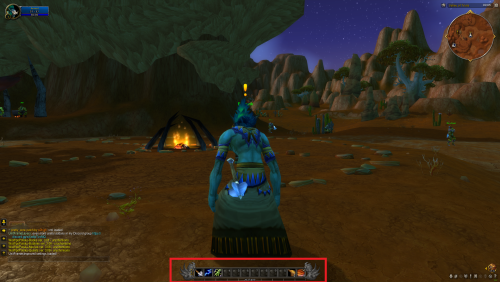
First I wanna say Thanks very much this person s0h2x for amazing work called "pretty_actionbar". This is for WoW 3.3.5a.
link: https://github.com/s0h2x/pretty_actionbar
What I'm was do? I'm extract one file from Dragonflight called "uiactionbar.blp" and upload here.
Instruction:
1.Download "pretty_actionbar" created by s0h2x https://github.com/s0h2x/pretty_actionbar
2.Download file upload by me (oroginal file creator Blizzard)
3.Extract file in "X:\WoW 3.3.5a\Interface\AddOns\pretty_actionbar\assets"
345 downloads
Updated
-
BattleForAzerothUI retroport 3.3.5 with ui alpha wow 0.5.3
By gongel
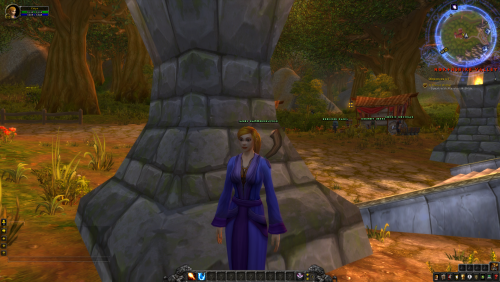
This addon is Battle for Azeroth UI mix with alpha UI World of Warcraft 0.5.3.
This addon is inspirated wmboxfu006 addon called BattleForAzerothUI Backported 3.3.5 link: https://forum.warmane.com/showthread.php?t=429591 .
Hope original author don't be angry for Me.
Credit for original addon thanks to wmboxfu006.
177 downloads
Submitted
-
Lion aplha wow 0.5.3 ui over gryphons UI
By gongel
Extracted from alpha World of Warcraft 0.5.3 and renamed to work with "actual game" Tested on wow 3.3.5
Have a good game.
65 downloads
Updated
-

DevMaster - GM Addon
By Смердокрыл
A user-friendly GameMaster and Developer addon.
Supports the latest TrinityCore Master, as well as (presumably) previous expansions.
!Early Alpha!
Inspired by an old Blizzcon video where parts of the GM interface were revealed (unfortunately, I have since been unable to find it again), and annoyed by the useful yet horrendously designed addons such as GMGenie and TrinityAdmin, I decided to make one of my own1.
The end goal is a simplistic Warcraft-style interface for executing the commonly used GM commands. I am still quite far away from it.
Features:
Convenient toggle-style buttons for the on/off functionality
Toggle-able and moveable panels for different utilities
Sliders for semiautomatic
selection of values
Morph panel with dynamic preview
709 downloads
Updated
-
Download Statistics